

The Enterprise Pro and Enterprise Max plans support several ways to store and share files, and the limits depend on where the files live.
The session limits below apply to the Enterprise Pro and Enterprise Max plans only, and Perplexity Pro and Perplexity Max subscribers may see different session limits. Project limits are the same for everyone, regardless of plan.
Why it matters
Knowing the storage and file-size limits for Projects and sessions helps your team plan uploads without hitting an unexpected block.
The organization file repository is being retired on October 1, 2026, so administrators need to know the migration deadline and where to move files instead.
Project limits are identical on every plan, so you don’t need to weigh Enterprise Pro against Enterprise Max for file capacity.
Files added from a connected app are one-time copies, so you know when to refresh content rather than assuming it stays current.
Where limits apply
Sessions
On Perplexity Ask, Enterprise Pro and Enterprise Max users can attach up to 30 files, each up to 50 MB, per upload in a session. Perplexity Computer supports files of up to 200 MB. This keeps sessions responsive while still allowing plenty of context in a single session.
Files can be uploaded directly from local storage, or added from third-party applications through File Connectors. You can attach up to 30 images per query.
Files uploaded to sessions are retained for 7 days, then deleted.
Projects
Every Project supports up to 5,000 files, 2.5 GB of total storage, and 100 MB per file. These limits are the same for all subscribers, regardless of plan, and there is no restriction on file type. New uploads and File Connector imports are rejected once they would push a Project past its file count or storage limit.
What Perplexity can do with a file then depends on where you use it. In Ask, only files with parsable text content can be read. Perplexity Computer can use code and other tools to work with formats Ask cannot — for example, it can open a .zip file added to a Project and read what is inside. Support isn’t guaranteed for every file type, so a file Perplexity cannot parse is stored without being searchable or actionable.
Limit | Value |
Total files per Project | 5,000 |
Total storage per Project | 2.5 GB |
File size | 100 MB per file |
Table 1 — Project file limits, identical on every plan.
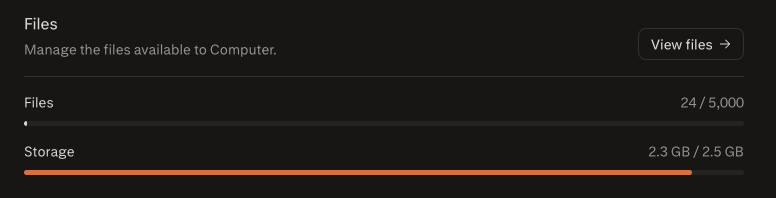
To see what a Project is using, open its Settings tab, which shows the current file count and total storage.
Projects created before August 2026 might contain more than 2.5 GB of files. These Projects will still work, but you won’t be able to upload new files to them.
Anyone with access to a Project can search the files added to it, but viewing file contents still requires permission on the connected app.
Files you add from a connected app are one-time copies. If you update or delete the original in the connected app, the copy in your Project does not change. To work from current content, ask Perplexity to fetch the latest version through the connector.
Organization file repository
Important: The organization file repository is being retired on October 1, 2026 and no longer accepts new uploads. Download the organization files your team needs by that date and add them to a Project or a supported File Connector. Files remaining in the repository after the deadline will be deleted. See Download and move your organization files.
Weekly session limits
On the Enterprise Pro plan you can attach up to 100 files per week across sessions, and on the Enterprise Max plan up to 1,000 per week.
Overview of file limits
Area | File upload limit | File size limit | Retention policy |
Projects | 5,000 files and 2.5 GB per Project, for all subscribers | 100 MB | Retained until deleted |
Sessions | 30 per upload, up to 100 per week on Enterprise Pro or 1,000 per week on Enterprise Max | 50 MB | Deleted after 7 days |
Organization files (retired October 1, 2026) | No new uploads | 50 MB | Download by October 1, 2026; files remaining after the deadline will be deleted |
Table 2 — Enterprise file limits by area.
Frequently asked questions
Is there a limit on the number of files in a Project?
Yes. Each Project holds up to 5,000 files and 2.5 GB of total storage, whichever it reaches first. Once a Project reaches either limit, new uploads and File Connector imports are rejected until you delete files to free up space.
Do Project limits differ between Enterprise Pro and Enterprise Max?
No. The 5,000-file limit, the 2.5 GB storage limit, and the 100 MB file-size limit are the same on every plan, including Perplexity Pro and Perplexity Max.
How do I check how much of a Project’s limit I’ve used?
Open the Project’s Settings tab, which shows its current file count and total storage.
Are there restrictions on which file types I can add to a Project?
No. Any file type can be added to a Project. Perplexity can only read and search supported formats, so a file outside those formats is stored without being searchable or actionable.
How many Projects can I create?
As many as you want. There is no limit on the number of Projects.
Do files added from a connected app stay up to date?
No. Files added from a connected app are one-time copies. If you update or delete the original, the copy in your Project does not change. To work from current content, ask Perplexity to fetch the latest version through the connector, or add the file again.