

Credits power Computer, Perplexity’s AI assistant that does multi-step work for you. Your plan may include a monthly amount. You can purchase more as needed.
Quick version: Today, 100 credits equals $1. Light tasks use about 15 to 70 credits. Bigger projects use more. You can see your balance and turn on auto-refill at perplexity.ai/account/usage.
Credit pricing, task ranges, and monthly allowances may change and can vary by promotion, region, or plan. We’ll update this page or your account settings if there are any significant changes to how credits work.
What credits get you
The credits a task uses depend on its complexity. Here’s a typical range by complexity (100 credits = $1). These are examples, not guarantees. Your actual usage may differ.
Complexity | Typical range (credits) | What it gets you | Example prompt |
Light | 100–350 | Research threads, summarization | ”Summarize an earnings call transcript and highlight risks.” |
Complex | 350–950 | Multi-step reports, analysis | ”Build a competitive landscape report with pricing and feature comparisons.” |
Heavy | 875–2,275 | Complex documents, research-and-code combos | ”Create a branded pitch deck with market sizing, financials, and competitor analysis.” |
Mega | 2,400–9,800 | Large projects, video production, data collection | ”Build an analytics dashboard, collect competitor data, and summarize findings.” |
How many credits do you get with your premium plan?
Computer credits are available to Pro and Max subscribers, including Enterprise Pro and Enterprise Max. The number of included credits depends on your plan.
Consumer Pro plans do not start with a set monthly amount. Consumer Max plans start with 10,000 credits a month. Enterprise plans start with a set monthly amount. See your account settings for the exact numbers on your plan.
When you first sign up you might also get a limited-time credit bonus. The bonus is one per account. It does not repeat if you cancel and resubscribe, switch between monthly and yearly billing, or apply a discount or education offer later.
Consumer plans start with:
Plan | Monthly credits | Limited-time bonus |
Pro | No monthly allocation | 4,000 credits (one-time, expire in 30 days) |
Max | 10,000 credits per month | 35,000 credits (one-time, expire in 30 days) |
Enterprise plans start with:
Plan | Monthly credits | Limited-time bonus |
Enterprise Pro | 500 credits per month | 8,000 credits (one-time, expire in 30 days) |
Enterprise Max | 15,000 credits per month | 45,000 credits (one-time, expire in 30 days) |
What credits are used for
Perplexity Ask searches do not consume credits.
Credits are consumed only when using Computer, Perplexity’s AI assistant that does multi-step work for you. Computer understands goals, gathers context, uses the right tools, and carries multi-step work forward across web, files, and connectors.
Computer tasks that are easier will require fewer credits, while those that require significant computing power, such as heavy video generation or large-scale data collection will use more credits.
Checking your balance and usage
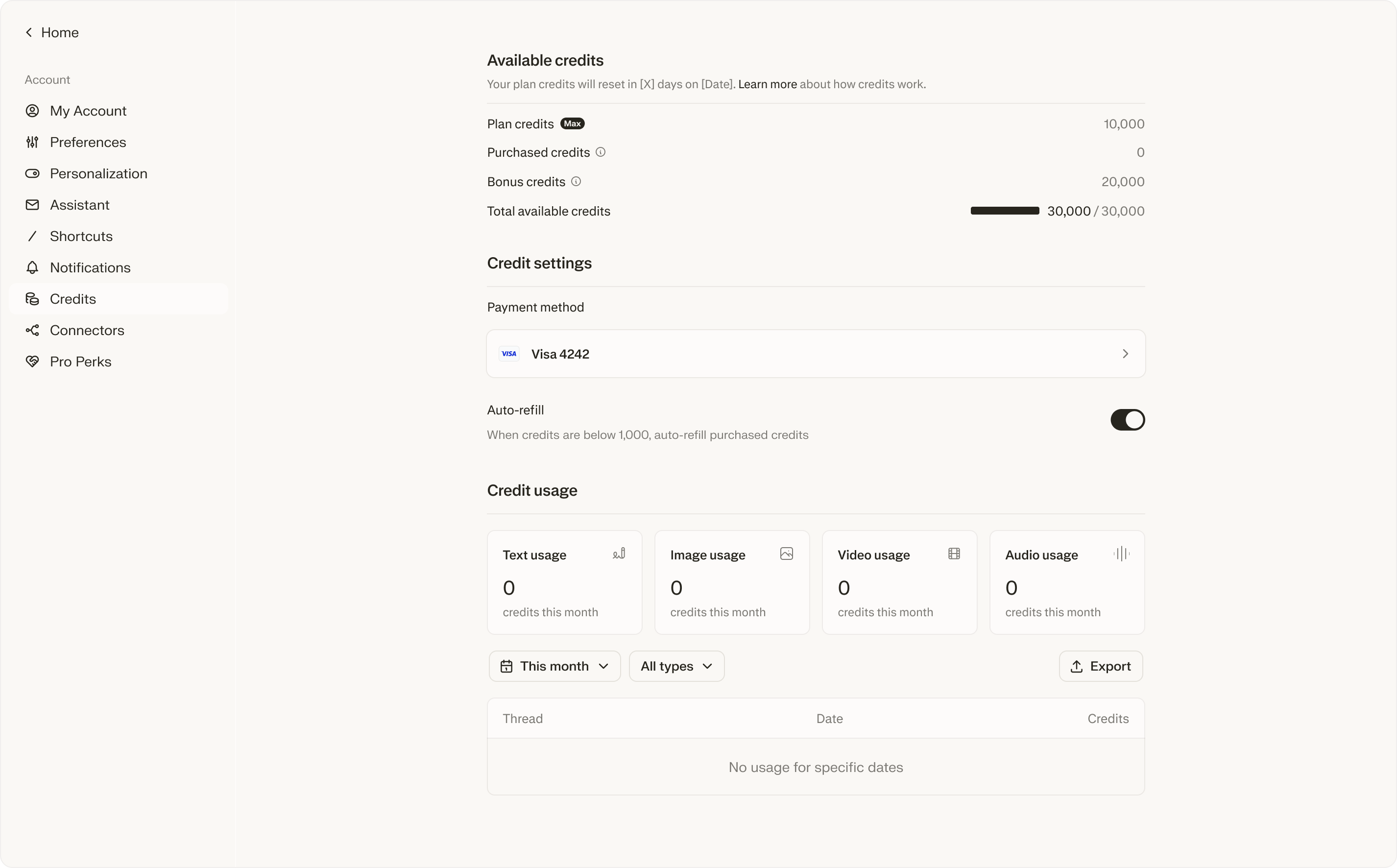
Visit perplexity.ai/account/usage to see:
Current balances of Bonus, Plan, and Purchased credits
Days until your next monthly refresh
Usage breakdown by type (text, image, video, audio) and by thread
Auto-refill and spending limit settings
For a single task, open the “Usage” dropdown in that thread. You will see how many credits you’ve used and the type of usage it was.
Credits are personal to your account. You cannot transfer or assign to another user. There are limited circumstances for enterprise accounts.
Credit types and resets
There are three types of credits, consumed in this order: Bonus first, then Monthly, then Purchased.
Bonus credits are granted at Perplexity’s discretion and expire on the date given when granted. These will be consumed first.
Monthly credits (shown as “Plan”) refresh on your billing cycle date. Annual subscribers still refresh monthly on the day you first signed up. Unused monthly credits do not roll over.
Purchased credits are consumed last. They stay in your account until you use them. If you do not use Computer for one year, they expire.
Credits are non-refundable. They cannot be redeemed for cash. They cannot be transferred or sold. They only pay for eligible Perplexity features. They carry no value outside Perplexity.
What happens when you run out
Active tasks pause. They do not cancel. Your work is saved. Tasks pick up where they stopped once you have credits again.
New tasks are blocked — You can’t start new tasks that use credits until you have credits again.
Tasks resume automatically — paused tasks pick back up on their own. As soon as you add credits or your monthly credits reset, they keep going.
Want to avoid pauses? Turn on auto-refill. It buys more credits before you hit zero so your tasks keep running.
Purchasing credits
Auto-refill
With auto-refill on, you can buy more credits automatically when your balance gets low. This keeps your tasks from being interrupted. The trigger is 500 credits for Pro and 2,500 for Max. This feature is off until you turn it on. Turn it off anytime at perplexity.ai/account/usage.
To turn it on:
Go to perplexity.ai/account/usage
Toggle on Auto-refill
Then set two things:
Refill amount — This is how many credits you buy each time (set any value you want)
Monthly auto-refill limit — This is the most you will automatically spend on auto-refill each month.
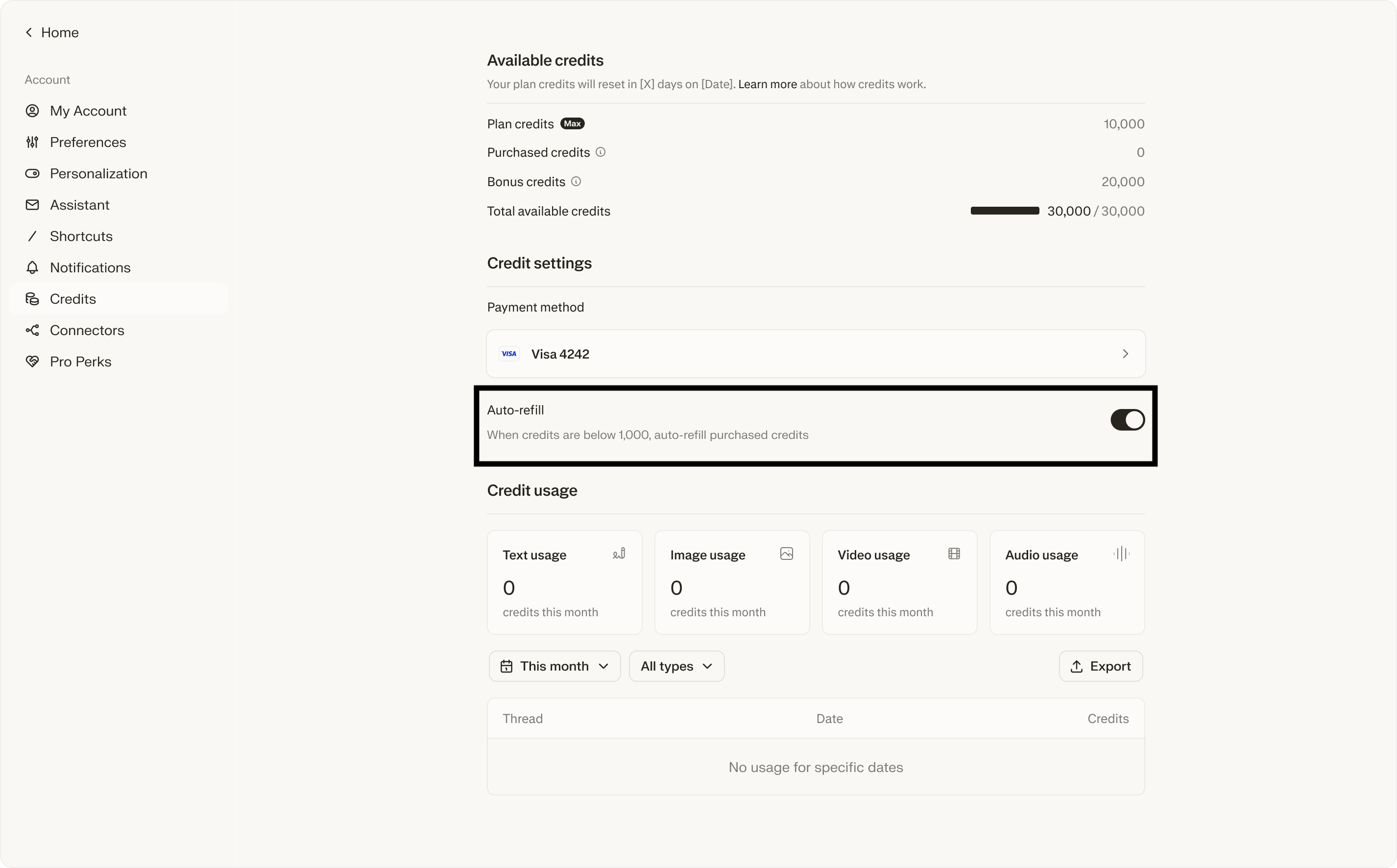
Auto-refill is off by default. You’ll never be automatically charged for credits without opting in first.
Manual Purchases
You can also choose to purchase one-time credits on your own. If your credits run out and you have not turned auto-refill on, your tasks will pause until you buy more or your monthly credits reset.
Spending limits
Every Max account has a monthly spending cap on total credit charges per billing period. The default is 5,000 in your credit settings.
If you hit the cap:
Active tasks pause.
You will see a notification with the option to raise your limit.
No more charges are made until you update settings.
Payment method
If you bought your subscription on the Perplexity website with a card, we default to that same card for credit purchases. If payment on the default card fails, we may attempt to charge other cards on file with Perplexity to avoid service disruption.
You can switch to a different default card for credit purchases at any time. It doesn’t have to match your subscription card.
If you upgraded to Max through the iOS or Android app, you’ll need to add a card on the website to use Computer.
If payment fails, your active tasks pause and we will email you. In most cases, you just need to update your payment method to resume your tasks.
Email notifications
We will email you when:
Credit purchase — confirmation when auto-refill adds credits
Low balance — when credits are running low (if auto-refill is off)
Out of credits — when you run out of credits and tasks pause
Spending cap reached — when you’ve hit your monthly spending cap
Payment failed — when an auto-refill charge couldn’t be processed
If you change your mind
You can turn off auto-refill anytime at perplexity.ai/account/usage. You can lower your monthly spending cap. You can cancel your plan from account settings. Monthly credits end when your plan ends. Purchased credits stay in your account for one year if unused.
Troubleshooting
What if a task fails?
If a Computer task can’t finish because of an error on our side, we restore the credits used for that task. The restored credits will show up in your balance, usually within a few minutes.
If a task finishes but the result is not what you wanted, credits are not automatically refunded.
Why you might see a negative balance
In a few situations, your balance can briefly go below zero:
A task that started before your credits ran out keeps running until it finishes. Any credits used past zero show up as a negative balance until your next refresh or refill.
A bonus credit expires while you have a task in progress. The task keeps going against your other credits, which can dip the balance.
Auto-refill is catching up after a low balance and the charge has not posted yet.
In each case, the next monthly refresh, auto-refill, or manual purchase can bring your balance back to positive. You are not charged extra for going temporarily negative.
Refunds
Can I get a refund on my credits? Yes, in specific situations. We refund credits when:
A Computer task failed because of an error on our side, like a tool crash, a sandbox error, or a network failure. If you think something went wrong, please send us the task URL to support and we will take a look.
You see a credit purchase you did not authorize, including an auto-refill charge after you turned auto-refill off.
You upgraded to Max by mistake and reached out within 24 hours.
Local consumer-protection law requires it. Where the law gives you stronger rights, those rules apply. Specifically, in accordance with applicable law, you may be entitled to a refund of unused credits:
In the EU, UK, and Turkey: Within 14 days of purchase; and
In Brazil and South Korea: Within 7 days of purchase.
What credits cannot be refunded?
Credits used by a Computer task that finished, even if the result was not what you hoped for. The credits paid for the computing power that ran the task.
Credits used by a task you stopped while it was still running. The credits already spent up to that point paid for real computing power.
Unused credits after you cancel your plan. Monthly credits end when your plan ends. Purchased credits stay in your account for up to one year so you can still use them, but they are not exchangeable for cash.
Credits that cost more than you expected for a task that ran as designed. Typical credit ranges are listed under “What credits get you.” If a task surprised you, share the task URL with support and we will incorporate your feedback into improving the product.
How do I request a refund?
Contact support and include the task URL, the charge date, or a screenshot of the charge. The more specific your example, the faster we can look it up. We will write back with our decision and, if approved, restore the credits to your account.
Frequently asked questions
Do monthly credits carry over? No. Unused monthly credits expire at the end of each billing cycle.
Do purchased credits expire? Yes — after one year of inactivity.
What happens to my credits if I cancel? All credits, monthly and purchased, are forfeited when your subscription ends and aren’t refundable, except where required by law.
Can Perplexity revoke my credits? Only in limited cases like fraud, abuse, or Terms of Service violations. We won’t revoke credits just because you use the product heavily within our policies.
Can I use credits on mobile? Yes! You can manually purchase credit packs on iOS, Android, and Samsung Galaxy Store.
I’m a Pro subscriber. How do I get credits? New Pro subscribers may get promotional credits to get started. Bonuses are one per account. Check your credit settings at perplexity.ai/account/usage for any current offers and your balance.
After your bonus runs out, Pro plans do not include monthly credits. To keep using Computer as a Pro subscriber, you buy credits in your credit settings at perplexity.ai/account/usage. You can choose how much to buy, and the credits stay in your account until you use them.
If you want monthly credits included in your plan, upgrade to Max. Max includes 10,000 credits a month.
I was charged for credits I didn’t authorize. Check your credit settings to confirm whether auto-refill is on. If you think there’s an error, contact support at support@perplexity.ai.